
What if we told you there was a simple project management tool that could help your business avoid unnecessary risks and unresolved issues before the end of your ERP project all while being a one-stop-shop for tracking your team’s open work and key project decisions? Chances are, you’d want to know about it before you started your implementation.
Well, we’re here to tell you all about it. It’s called a RAID log, and with the help of an experienced ERP partner like RPI, it could save you and your organization lots of time and money from the get-go.
So, ready to learn more about a RAID log? Let’s get into it.
What Does RAID Stand For?
First up is the RAID acronym. Depending on how you leverage the RAID log, that acronym can represent several things, but if simplification and consolidation is your goal, it stands for Risks, Actions, Issues, and Decisions: four categories of information that are critical to manage throughout the ERP project lifecycle.
Risks: An uncertain event or condition of any size, (such as data migration, data quality, cost overruns, cost-saving opportunities, change management, testing, and more) that can either positively or negatively impact a project’s objectives.
Actions: The detailed tasks that arise directly from discussions or your project milestones. These are specific work items, with owners and due dates that must happen for the project to stay on track.
Issues: Problems that have already surfaced and need resolution, fast. These can include unclear requirements, system bugs or necessary design changes identified in testing and inadequate change management efforts.
Decisions: Key choices made during the project: when, why, and by whom. Decisions will need to be made with regard to system scope, implementation strategy, budget and contingency funds, and more.
Together, these four categories give project teams a complete picture of what’s at risk, what’s in motion, what’s broken, and what’s been decided.
What Is a RAID Log, Anyway?
In project management terms, a RAID log is a central project document, with a standardized format, created right at the beginning of a project and maintained consistently through the duration of it—all the way up to go-live and the early days post-live. It provides a single source of truth for everything that could affect whether (or not) the project succeeds.
Note that some versions of the RAID acronym use “Assumptions” instead of “Actions,” and “Dependencies” in place of “Decisions.”
If you’re curious about which variation your business should use, here is some additional context.
“Actions” work well for projects with many moving parts and tasks to track, while “Assumptions” make more sense for long-term initiatives that require significant forethought. “Dependencies” should be surfaced when one workstream is blocked until another is completed; “Decisions” are the right choice when the record of what was decided, and why, is what matters most.
The four original categories (Risks, Actions, Issues, Decisions) tend to apply best with regard to cloud ERP implementations. However, they can be beneficial in a wide variety of other projects small and large as well. Feel free to choose the terms that best fit your organization and your project.
Why ERP Projects Need a RAID Log
You may be asking, “Why do I need a RAID log, when I already have a project plan?” Here’s the difference: your project plan should reflect timelines, milestones, and detailed workstreams, while the RAID log should capture everything that potentially threatens said plan.
During an ERP implementation, or even a re-implementation, that list can get long fast. A lot can go sideways, with multiple stakeholders, complex integrations, data migrations, and change management work all coming into play.
The RAID log keeps it all visible and agreed-upon. Here’s how it works: when everyone can see what’s in the log, no one can claim they didn’t know something was flagged. When actions have published due dates, the owners are more likely to follow through with them. When decisions are documented, there’s no need to re-open settled questions if a new stakeholder gets involved.
ERP projects don’t always meet expectations. In fact, Gartner predicts more than 70% of recently implemented ERP initiatives will fail to meet their original business goals by 2027. The reason is often because of poor project governance (unclear ownership, undocumented decisions, untracked risks). A RAID log can help you avoid the organizational and communication failures that cause otherwise sound projects to go off track.
Setting Up Your RAID Log
Now that we’ve identified the basics of a RAID log, it’s time to get into the details of building one.
Risks
With regard to ERP projects, common risks include key stakeholder availability during testing, data quality issues discovered during conversion, and scope changes that affect go-live readiness.
But a robust risk management strategy considers that not all risk in a project is negative and also looks for opportunities to improve the chance of a positive risk occurring. So, how do you set yourself up for future success by identifying these risks and opportunities proactively?
The goal here is to anticipate potential risks before they occur and document them. Each risk entry should include a description, an assessment of likelihood and impact, a mitigation plan or in the case of a positive risk, an optimization strategy, and an owner responsible for monitoring it.
When a negative risk does materialize, its category on the RAID should change from risk to issue. More on issues below.
Actions (or Assumptions)
Make sure the actions in your RAID log capture the specific tasks that are tied to project milestones. Your project plan will tell you what needs to get done; use the actions log to document when (or if) a work item was actually completed.
If your team uses the “Assumptions” variant, you should document the conditions the team is operating under: that is, list the things you’re confident enough about to plan around, but haven’t yet verified. If something unexpected occurs, you can often trace it back to an assumption that turned out to be incorrect.
Issues
Though issues may appear similar to risks, they serve different roles in your project and your RAID log. So, ensure your log reflects these important distinctions:
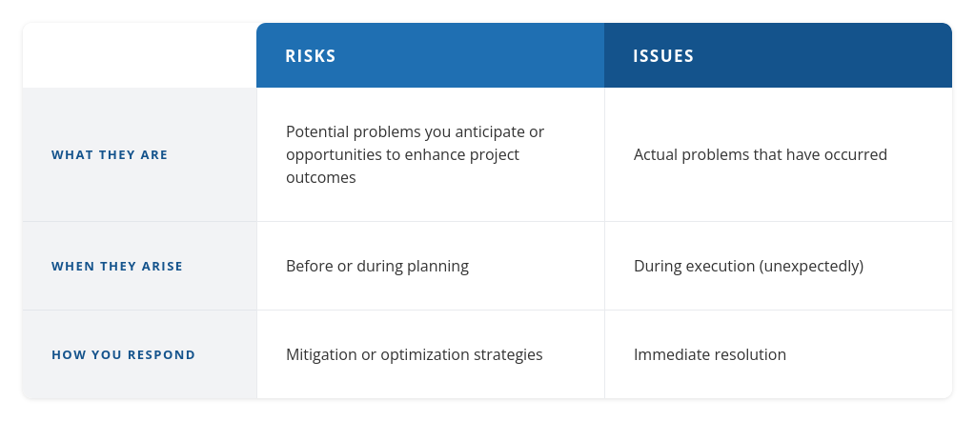
Assign an owner, a resolution plan, a target date, and a status to every issue. Documenting issues makes them trackable, and trackable problems get solved faster than ones sitting in someone’s inbox.
Decisions
Be sure to capture both open and closed decisions. “Open” refers to items where someone still needs to make a call, while “closed” refers to the choices that were made, when, by whom, and why.
It’s especially important for you to document the “why.” Months after go-live, when someone asks why the system was configured a certain way, you can simply look back at the written-down answer.
If your project has a lot of workstreams that are blocked until a particular task is completed, it may be more useful to track dependencies instead of decisions. Many teams do both.
What to Include in a RAID Log
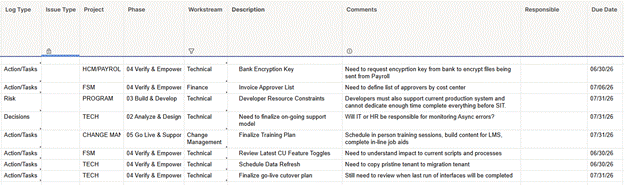
When it comes to documenting your RAID log, you have a variety of options: anything from a spreadsheet to a purpose-built project management program. Pro tip: Make sure whatever tool you use has the ability to adjust the priority of items.
What matters even more than format is consistency and simplicity. This is so even non-project managers, or people who missed a meeting, can understand it at a glance. Every item in the log should capture this standard set of fields:
- ID number: A unique identifier so items are easy to reference in meetings, email, Slack messages and so forth
- Category: Which of the four RAID types this item falls under
- Description: A concise, plain-language summary of the risk, action, issue, or decision
- Priority: High, medium, or low
- Next actions: The specific steps being taken to address an item
- Owner: The person responsible for monitoring or resolving a work item
- Date identified: When the item was first logged
- Last update: When the items was last addressed
- Status: Open, in progress, or closed
- Comments: A field to capture succinct notes for ongoing management and progress on the item
This structure makes the log helpful in status meetings and useful long after the project ends.
Who Owns the RAID Log?
Typically, the project manager owns the RAID log; however, maintaining it is a team responsibility. The RAID is most effective when everyone on the project feels empowered to contribute by flagging new items, providing status updates on items they own, and closing out resolved items.
The RAID log also serves a governance function on your ERP project. When your team is working side-by-side with consultants across functional areas, a shared RAID log creates accountability across the full project team.
When to Create a RAID Log
Start your RAID log before discovery or design begins and review it in your weekly status meetings. The log should also be updated whenever a new risk surfaces, an action is required, an issue is identified, or a key decision is made.
Use it or lose it, though; if you create a RAID log in week one and never open it again, it will provide nothing but false assurance. Outdated information is worse than no information, because it creates the impression that items are being tracked, even if they aren’t.
RAID Log & RICE Inventory: How They Work Together
If you’re planning an ERP implementation, you’ll find that the RAID log pairs nicely with a RICE inventory. This is the document that captures your technical requirements for Reports, Interfaces, Conversions, and Enhancements.
The RICE inventory defines what needs to be built for the project to succeed, while the RAID log tracks everything that affects whether or not those requirements are delivered as designed and on time.
RPI uses both the RAID log and RICE inventory to structure ERP implementations from day one. Together, these tools give your project teams full visibility into requirements and risk from pre-planning through go-live.
Why Work with a Proven Technology Partner?
Any ERP implementation represents a major undertaking, and putting together a RAID log is just one of the many steps involved. Plus, managing a RAID log in-house can consume valuable time and money at your organization.
That’s why, at RPI, we recommend that you create a RAID log with guidance from an expert implementation partner. This will help ensure that nothing falls through the cracks.
RPI Consultants has over 25 years’ experience assisting organizations with ERP implementation and related projects. So, if you need help creating a RAID log, let’s talk. Contact us below.

RAID Log Frequently Asked Questions
1. What is a RAID log in the context of project management?
RAID is a centralized logging and analysis toll used by project managers to track critical project factors, maintain accountability and keep stakeholders informed through the project lifecycle. This gives the product management office (PMO) a high-level view of potential problems or opportunities across multiple engagements, and supports strategic resource and risk decisions.
2. Who’s responsible for the RAID log?
Typically, the project manager owns the RAID log. However, all team members contribute by flagging new items, providing updates, and closing out the items they own.
3. How often should a RAID log be updated?
Review your RAID log, at a minimum, during every weekly status meeting, and update it whenever a new risk, issue, or key decision arises.
4. What’s the difference between a RAID log and a risk register?
A risk register focuses exclusively on risks: their likelihood and potential impact, as well as strategies for mitigating them. A RAID log includes a risk register, but extends it to cover active issues, action items or assumptions, and the full decision record of the project.
5. Can a RAID log replace a project plan?
No. A RAID log supplements your project plan. The project plan helps you track scope, schedule, and resources. Use the RAID log to manage the risks, issues, actions, and decisions that affect the plan.
6. What’s the difference between a RAID log and a RACI chart?
A RAID log tracks project Risks, Actions, Issues, and Decisions. A RACI chart clarifies team roles by defining who is Responsible, Accountable, Consulted, and Informed for each task. The two tools are complementary: RACI tells you who does what, RAID tells you what to watch.