
Mid-sized hospital systems process thousands of invoices a month, and most AP teams still touch nearly every one of them. In fact, Ardent Partners’ 2025 State of ePayables research found that only about half of invoices are even submitted electronically.
In 2026, you would think these organizations would have moved away from such a manual approach. But the reality is that healthcare accounts payable is complex: a single hospital juggles hundreds of vendors, and invoices range from routine supply orders to capital equipment purchases that each follow different approval paths. With teams under increasing pressure to do more with less, it can be difficult to find the right solution, let alone champion a new process.
That complexity is exactly why a generic AP tool falls short in this space. Healthcare requires an accounts payable automation solution built for how hospitals work—a solution that captures invoice data, matches it against purchase orders, and posts it directly to the ERP. When configured correctly, it eliminates the manual touches on every invoice so staff only handles the exceptions.
If your hospital runs Infor CloudSuite or Lawson, the solution you pick matters as much as the decision to automate. The wrong tool could be disjointed from your ERP; the right one, like RPI’s Yoga Flexible Software, works seamlessly with it.
So, if you’re considering accounts payable automation and wondering where to begin, here are seven factors to weigh before you commit to a solution in 2026.
7 Factors Hospitals Should Evaluate in Healthcare Accounts Payable Automation
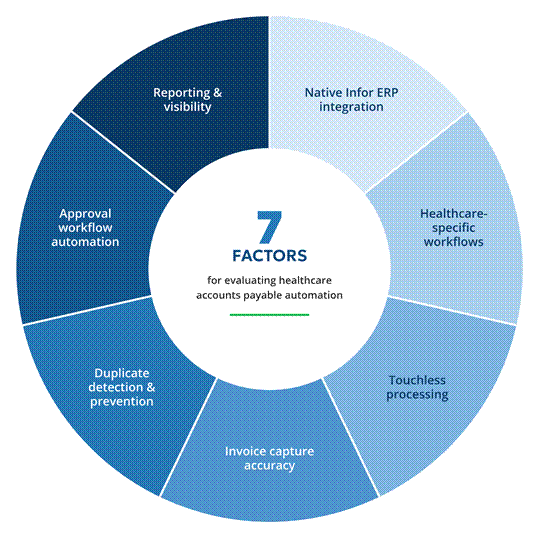
There is no shortage of accounts payable automation solutions out there, but as you look for a solution that checks the box on these seven factors, your search will narrow and only the most sophisticated solutions will remain.
1. Native Infor ERP integration
First and foremost, your AP automation solution should work directly inside your Infor CloudSuite or Lawson environment. When the solution natively integrates, that means invoice data flows automatically into your ERP system without the need for middleware or manual exports.
Also look for a platform that keeps purchase orders, vendor masters, and GL coding refreshed from your ERP throughout the day rather than through a nightly batch. Doing so will help eliminate the risk of duplicate data entry and ensure greater accuracy with your financial records.
2. Healthcare-specific workflow configuration
Healthcare is a uniquely complex space and thus deserves a solution that understands all the nuances that shape it. Hospital invoice processing in particular follows patterns other industries don’t share. The ideal healthcare accounts payable automation solution should have approval routing based on department cost centers, exception handling for capital equipment, and support for complex purchase order matching.
RPI Consultants’ Yoga for FSM is configured around these healthcare-specific patterns. PO validation, line-level matching, and reason-coded exceptions run across Yoga’s healthcare customer base, and its approval chains, department code and dollar-threshold routing with delegation and escalation, are already handling multi-level sign-off at one large health system. Configuration adapts to how your finance team already works instead of forcing a generic template onto it. You can see it in action below.
3. Touchless processing capabilities
With so many hospital systems manually processing and reviewing invoices, it’s worth asking two related but different questions when evaluating solutions: how many invoices reach the ERP with nobody routing them by hand (straight-through), and how many reach it with nobody editing a field at all (touchless, since a person may still glance at or route an otherwise clean invoice). These two figures together measure your automation’s effectiveness far better than either one alone—so be sure to ask about both!
A mid-sized hospital processing thousands of invoices monthly needs a high touchless rate to keep pace. At Cooper Health, for example, 93.5% of EDI invoices now post with no one editing a field, and monthly invoice volume has grown from about 8,000 to about 13,000 as EDI came online. Results like these free your AP staff to focus on exceptions instead of routine data entry. That should be the expectation for healthcare accounts payable automation solutions.

4. Invoice capture accuracy
Optical character recognition (OCR) is another critical area to evaluate during the vetting process as quality varies significantly between platforms. Look at how well each solution extracts data from the invoice formats you already receive, including everything from scanned paper and emailed PDFs to EDI transmissions.
Intelligent capture should identify invoice numbers, dates, line items, and amounts correctly on the first pass. Poor extraction rates create downstream bottlenecks that defeat the purpose of automating in the first place. And be wary of tools that promise AI magic without measurable accuracy: in finance, confident inaccuracy is more dangerous than obvious failure, because a wrong GL code that looks reasonable sails through unnoticed.
5. Duplicate detection & prevention
Vendors frequently send the same invoice through multiple channels. Without automated duplicate detection, your team wastes time processing the same document twice, or worse, paying it twice.
When a West Virginia hospital system rebuilt its AP process for Infor CloudSuite, automated detection flagged more than 60,000 invoices as possible duplicates over the past year, together worth about $354 million in face value held for review before any of it went out the door. The health system also reported that its 14,000-invoice backlog dropped to zero after go-live.
6. Approval workflow automation
Email-based approval routing is a common workflow in healthcare; the only challenge is that it creates delays and lacks accountability. Your accounts payable automation solution should route invoices to approvers automatically based on dollar thresholds and department hierarchies.
The best platforms use AI to make these workflows smarter over time, without handing your financial logic to a “black box.” Yoga tracks the corrections your team makes on each vendor’s invoices, and when the same fix happens repeatedly, it proposes a vendor rule and tests it against past invoices. A recommendation only becomes active automation after someone on the team reviews and approves it, converting it into a deterministic rule that produces the same outcome every time. AI does the pattern recognition; your staff keeps control of the process.
Built-in escalation keeps approvals from stalling when someone is away. At one large health system already running Yoga’s approval chains, invoices that sit untouched for a set number of business days move automatically to the next approver, and a daily digest email gives everyone a running list of what’s waiting on them.
7. Reporting & visibility
At the end of the day, a modern accounts payable solution should provide deep visibility into the financials moving through your hospital system. You should know exactly where every invoice sits in your workflow at any moment.
Dig into what each platform’s reporting actually surfaces, because this is where solutions separate. An executive should get a live read on payables health: what’s due, what’s past due, where the risk sits, and which early payment discounts are about to expire before their window closes.
That’s not the only visibility you’ll need either. AP leadership, for example, needs a different view, one that shows every invoice’s full routing history so they can spot bottlenecks and measure whether automation is actually working. The best reporting also quantifies its own value, tracking duplicate invoices caught and the dollars saved.
Reports and system dashboards should also include a range of use cases, everything from high-level summaries down to line-item detail depending on who’s looking should be accessible. And these reports should export to Excel and link directly to the underlying invoice documents.
Historical reporting helps you track improvements and spot process bottlenecks. That data supports continuous improvement and justifies your AP automation investment to stakeholders.
Get Started with Healthcare AP Automation for Infor ERP
Selecting the right healthcare accounts payable automation solution starts with understanding your hospital’s invoice volumes and approval structures, then testing vendors against them. The seven factors above give you that scorecard: integration depth, workflow fit, touchless rates, capture accuracy, duplicate protection, AI you can control, and reporting your controller will trust.
RPI Consultants brings more than 25 years of healthcare expertise and deep Infor consulting experience to every engagement. As a premier Infor Alliance partner, RPI built Yoga for healthcare finance and supply chain teams. Every Yoga customer ran a vetting process just like the one you’re starting now, weighed the same factors, and landed on Yoga. They’re glad they did, and their results show why.
Ready to put Yoga through the seven factors? Schedule a consultation with RPI Consultants and bring a sample of your own invoices. In finance, automation only proves itself against real production data, and that’s exactly how we’d suggest you test us.

Healthcare Accounts Payable Automation for Infor ERP FAQ
1. What makes healthcare AP automation different from general AP solutions?
Healthcare accounts payable automation addresses industry-specific requirements like complex purchase order structures and approval routing based on clinical department hierarchies, along with compliance documentation general solutions rarely handle. Hospital workflows demand configurability most general-purpose tools lack.
2. What AP automation solution works best for Infor CloudSuite?
Yoga, built by RPI Consultants for healthcare finance teams, is built primarily for Infor CloudSuite, with Infor Lawson v10 also live at one health system. Invoice data posts directly to your ERP without middleware or manual re-entry, so automation builds quickly after go-live rather than requiring a slow ramp.
3. How long does it take to implement AP automation for Infor CloudSuite?
Most Yoga customers are running full production invoice volume just a few months of contract start, and hospitals implementing Yoga onto an already-stable CloudSuite environment are often on the faster end of that range. Pairing Yoga’s implementation with a CloudSuite go-live or migration adds coordination across more moving parts and typically takes longer. The work includes configuration, integration testing, user training, and a stabilization period after go-live.
4. How does Yoga use AI in accounts payable?
Yoga tracks the corrections your team makes on each vendor’s invoices, and when the same fix happens repeatedly, it proposes a vendor rule and tests it against past invoices. No rule goes live until someone on your team reviews and approves it, which converts it into a deterministic, testable rule. As of September 2026, about 6,500 of these vendor rules are running across Yoga’s customer base, each one tested and approved before it took effect. Your organization keeps control of its financial logic instead of outsourcing it to probability.
5. Can AP automation integrate with legacy Infor Lawson systems?
Yes, through RPI’s on-premises Yoga Bridge agent, which connects to Lawson v10 and posts PO and non-PO invoices (credit memos and service-contract invoices don’t yet post through that path). Most of RPI’s production experience is on Infor CloudSuite, and a Lawson deployment is scoped to your specific version and configuration.
6. How does AP automation handle invoice exceptions?
Invoices that can’t be processed automatically route to designated exception queues, each tagged with the reason it stopped. Staff work the queue while reporting shows how long items have been waiting, so managers can spot bottlenecks. Over time, teams refine vendor rules to reduce how often the same exception repeats.